
Download Snoring Analyzer APK – Snoring Detection, Sleep Analysis, Snore Score, Lifestyle App
Overview
Snoring Analyzer is a lifestyle-focused mobile application developed by AppMeisters for the Android platform. Designed to help users understand and address snoring issues, the app records sleep sounds throughout the night and provides a daily snore score based on detected patterns. Its primary purpose is to assist individuals in identifying the frequency, intensity, and timing of their snoring episodes, offering insights that may contribute to improved sleep quality and overall well-being.
The app targets consumers concerned about their sleep health, particularly those who experience frequent snoring or are seeking non-invasive ways to monitor their nocturnal breathing patterns. While the developer is identified as AppMeisters, no further information about the company’s background or history was provided. Real-world usage scenarios include nightly monitoring of snoring behavior, review of audio recordings, and visual analysis through simple graphs to detect trends over time.
The app aims to empower users with data-driven awareness, enabling them to make informed lifestyle choices or consult healthcare professionals when necessary.
Key Features & Capabilities
- Sleep Sound Recording: The app captures ambient sounds during sleep, focusing on snoring events. This allows users to review what occurred during the night and assess the nature of their snoring.
- Snore Score Calculation: After each night’s recording, the app generates a snore score, which serves as a quantitative measure of snoring activity. This score can be used to track progress over time.
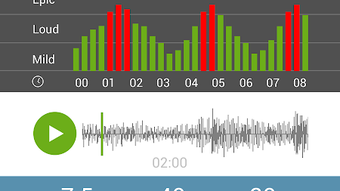
- Audio Playback and Review: Users can listen to recorded sleep sessions to identify specific moments of snoring, helping to correlate snoring with body position or sleep stage.
- Graphical Data Visualization: Simple graphs display snoring frequency and intensity, offering a visual representation of nightly patterns for easier interpretation.
- User-Friendly Interface: The app features an intuitive layout designed to make data access and analysis straightforward, even for non-technical users.
- Lifestyle Insights: Based on recorded data, the app provides general suggestions for potential solutions, such as positional changes or lifestyle adjustments.
These features support users in gaining insight into their snoring behavior. For example, a user might notice that snoring increases when sleeping on their back and decide to adjust their sleeping position accordingly. The app does not offer medical diagnostics but functions as a self-monitoring tool to raise awareness and encourage proactive steps toward better sleep hygiene.
User Interface, Workflow & Performance
The user interface of Snoring Analyzer is described as simple and easy to navigate, with a focus on accessibility for general consumers. Navigation appears to be structured around core functions: recording initiation, playback of recorded sessions, viewing snore scores, and accessing visual data. The workflow is designed to be minimal—users likely start a recording before sleep, let it run overnight, and review the results the next morning.
No specific details about CPU or RAM usage were provided, and performance observations are based on general software behavior patterns. The developer did not specify resource usage details. Stability during long-term recordings was not confirmed.
However, given its nature as a background audio recording tool, the app is expected to operate with minimal interference during sleep. Users should ensure that the device remains powered and positioned appropriately for optimal sound capture. The app does not appear to require constant user interaction, which supports seamless operation during sleep cycles.
Compatibility & System Requirements
Snoring Analyzer is designed for the Android operating system. The app is available as an APK file, indicating it is distributed outside the official Google Play Store. Specific version details were not provided.
Installation size is not specified, nor were exact system requirements listed. The developer did not provide information about minimum hardware specifications such as RAM, processor type, or storage capacity. Compatibility information was partially provided, confirming Android as the supported platform.
Users should ensure their device supports background audio recording and has sufficient storage for nightly recordings. The lack of detailed system requirements means users may need to test the app on their device to confirm functionality. No information was provided regarding support for tablets, wearables, or other devices.
Pros and Cons
Pros
- Free to download and use, making it accessible for budget-conscious users.
- Simple, intuitive interface suitable for non-technical users.
- Provides daily snore scores and visual graphs for trend tracking.
- Enables users to listen to recorded sleep sounds for personal analysis.
- Offers lifestyle suggestions based on detected snoring patterns.
- Available as an APK, allowing access without relying on app store distribution.
Cons
- No official confirmation of compatibility with all Android devices.
- Exact performance and resource usage details were not specified.
- Does not provide medical diagnosis or professional health advice.
- Relies on user device placement and ambient noise, which may affect recording accuracy.
- Limited information about data privacy and storage practices.
- APK distribution may raise security concerns for cautious users.
FAQ Section
Is Snoring Analyzer available for iOS devices?
The app is confirmed to be available for Android only. No information was provided about iOS compatibility or future plans for other platforms.
Can I use Snoring Analyzer without an internet connection?
Yes, the app functions offline. Recording, playback, and score calculation occur locally on the device, eliminating the need for an active internet connection.
How accurate is the snoring detection?
The app detects snoring based on audio input and applies internal algorithms to generate a snore score. However, accuracy may vary depending on device placement, ambient noise, and microphone quality. The developer did not provide specific accuracy metrics.
Does the app store my recordings permanently?
Recording retention policies were not disclosed. Users should manage their data manually and be aware that recordings may be deleted automatically after a certain period or when storage is low.
Is Snoring Analyzer safe to download as an APK?
While the app is developed by AppMeisters, downloading APKs from third-party sources carries inherent risks. Users should ensure the source is trusted and verify the app’s digital signature before installation.
Final Thoughts
Snoring Analyzer offers a practical, accessible solution for individuals seeking to monitor and understand their snoring patterns. As a free Android app, it delivers core functionality—recording sleep sounds, calculating snore scores, and presenting data through simple visuals—without requiring technical expertise. While it does not replace medical evaluation, it serves as a useful self-assessment tool for lifestyle improvement.
The app’s strengths lie in its simplicity, affordability, and focus on user empowerment. However, users should be mindful of its limitations, including potential inaccuracies due to environmental factors and the absence of detailed system requirements. For those looking to take the first step in addressing snoring, this app provides a low-barrier entry point.
Download Snoring Analyzer now to begin tracking your sleep sounds and take control of your sleep health.







